Sponsored
Currently unavailable.
We don't know when or if this item will be back in stock.
Added to

Sorry, there was a problem.

There was an error retrieving your Wish Lists. Please try again.

Sorry, there was a problem.

List unavailable.
Sponsored
  • 6 VIDEOS
  • AZERON Cyborg Gaming Keypad – Programmable One Handed Keyboard for PC Gaming – with Analog Thumbstick and 29 Programmable Keys – 3D Printed Keypad – for Righties (White Lime)
  • The key feature of AzeronAZERON

AZERON Cyborg Gaming Keypad – Programmable One Handed Keyboard for PC Gaming – with Analog Thumbstick and 29 Programmable Keys – 3D Printed Keypad – for Righties (White Lime)

4.4 out of 5 stars (602)

Currently unavailable.
We don't know when or if this item will be back in stock.

About this item

  • Azeron Cyborg Gaming Keypad offers next-gen adjustability and ergonomics. The angle and distance of the towers and the position of the top buttons can be adjusted to match your hand perfectly.
  • Advanced, adjustable analog thumbstick can be used as WASD on the analog stick or as 360° movement for games that support it. Adjust your preferred angle, dead zones, and sensitivity. Easy to use calibration tool. Has a mid-click too.
  • 29 programmable keys can be set up as keyboard, controller, mouse buttons, or as Macro keyboard. Each button is connected to an individual input, there are no connection matrices.
  • Map your keys in 2 easy clicks. Create unlimited keybind profiles on your PC, and store 2 in on-board memory for quick switching. The gaming keypad is for left-hand usage (mouse on right hand) for right-handed people.
  • The next-generation Azeron keypad that raises the bar in gaming. Lightning fast response times, precise actions. Perfect for various genres, such as FPS, MOBA, RPG etc. All images are for illustration purposes only, there can be a slight difference of the color tones.

Check Compatibility

Choose your brand
Sponsored

Product guides and documents


Product description

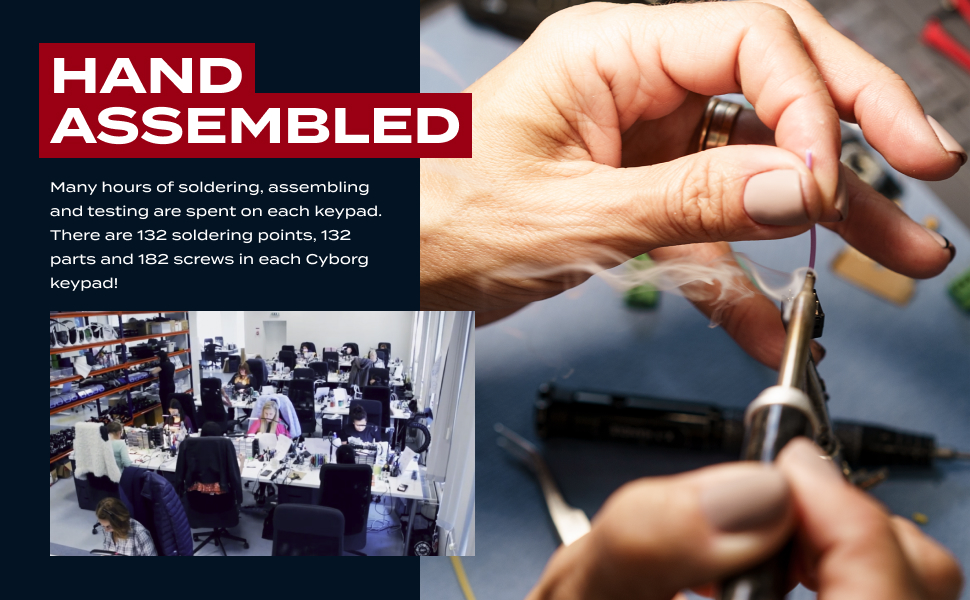
Hand assembled keypad
Lifting towers
Thumbstick Position
Palmrest height
Tower angle
Tower distance
Save loads of game profiles

Product information

Warranty & Support

Amazon.com Return Policy:You may return any new computer purchased from Amazon.com that is "dead on arrival," arrives in damaged condition, or is still in unopened boxes, for a full refund within 30 days of purchase. Amazon.com reserves the right to test "dead on arrival" returns and impose a customer fee equal to 15 percent of the product sales price if the customer misrepresents the condition of the product. Any returned computer that is damaged through customer misuse, is missing parts, or is in unsellable condition due to customer tampering will result in the customer being charged a higher restocking fee based on the condition of the product. Amazon.com will not accept returns of any desktop or notebook computer more than 30 days after you receive the shipment. New, used, and refurbished products purchased from Marketplace vendors are subject to the returns policy of the individual vendor.

Feedback

Image

AZERON Cyborg Gaming Keypad – Programmable One Handed Keyboard for PC Gaming – with Analog Thumbstick and 29 Programmable Keys – 3D Printed Keypad – for Righties (White Lime)


Found a lower price? Let us know. Although we can't match every price reported, we'll use your feedback to ensure that our prices remain competitive.

Where did you see a lower price?

Price Availability
/
/
/
/
Please sign in to provide feedback.

Safety and product resources

Safety documents

What's in the box

  • Keycap Puller
  • Sponsored

    Brands in this category on Amazon

    Customer reviews

    4.4 out of 5 stars
    602 global ratings
    Sponsored

    Customers say

    Customers find the gaming keyboard extremely comfortable and praise its build quality, with one noting it's the best thing they've purchased for PC gaming. The keyboard is ingeniously adjustable, and customers appreciate its responsiveness, with one mentioning it has 26 control points. While customers find it easier to use than keyboard commands, they note it takes some time to get used to. The functionality and ergonomics receive mixed feedback, with some reporting it works well while others say it's not functioning properly, and one customer mentions their hand falls asleep after long hours of use.
    AI Generated from the text of customer reviews

    Select to learn more

    56 customers mention build quality, 40 positive, 16 negative
    Customers praise the build quality of the keyboard, describing it as a high-quality gaming controller.
    Great product this makes gaming with a keyboard more enjoyable love this product!!!!Read more
    ...All in all this is the best controller you are likely to put your hands on... at least until they start embedding them in our brains.Read more
    What I found that I disliked about the product the most was the flimsy....Read more
    ...D-pad $200 Otherwise it is a good product and I'll happily endorse it.... especially if the make the proportional thumbstick...Read more
    32 customers mention customizability, 25 positive, 7 negative
    Customers appreciate the keyboard's customizability, noting that it is ingeniously adjustable and can be seamlessly adjusted to their hand size, with one customer mentioning that the thumb stick is also adjustable.
    ...The learning curve is very minor and the customization is just awesome. I use this for every game I own and I highly recommend it.Read more
    This gamepad is adjustable, comfortable, and adaptable. There is a training curve, but once that's conquered, it's amazingly responsive....Read more
    ...Great quality and EXTREMELY customizable! Would recommend 100000000%Read more
    ...It works amazing. My only problem is that the palm rest isn’t adjustable as well. Hopefully version 2.0 will be.Read more
    17 customers mention button responsiveness, 12 positive, 5 negative
    Customers appreciate the keyboard's responsive buttons, with one mentioning the ability to switch between two different button/key mappings, while another notes the ease of customizing button placement and programming.
    ...You can extend, shorten, and twist it in all sorts of ways. Buttons are very responsive....Read more
    ...it is more ergonomic than a keyboard, but it has more mappable keys/buttons than a controller, and most importantly I get to keep my beloved mouse....Read more
    I love the look of the azeron controler, but there are too many buttons, and they are too easy to accidentally press....Read more
    ...sore every ability is just a click away no stretching and no erroneous button clicks. It really is fully customizable to fit different hand sizes....Read more
    16 customers mention gameplay, 14 positive, 2 negative
    Customers report that the keyboard enriches their gaming experience, with one customer noting it made them competitive in online play.
    ...the learning curve is a little long but this thing has already improved my game....Read more
    ...Adds a very unique and fun gaming experience.Read more
    I know, the title is cliché but this device will change your gameplay. I current was using the latest Razer Tartarus gamepad and came across this....Read more
    ...It is definitely cool playing a game with this thing, and I can imagine that playing a game with more controls, like flying a ship or RTS games be...Read more
    11 customers mention comfort, 8 positive, 3 negative
    Customers find the keyboard comfortable.
    ...but once I purchased my original Azeron I was in love with how COMFORTABLE it was to rest my hand in/on, and the ease of customizing button...Read more
    The customization of this device is as advertised, and really feels good to use....Read more
    ...This is very annoying, and using the joystick doesn't give me the same type of control. If it wasn't for this issue, my review would be 5 stars....Read more
    ...So much more comfortable.Read more
    37 customers mention ease of use, 22 positive, 15 negative
    Customers have mixed experiences with the keyboard's ease of use: while some find it easier to use than traditional keyboard commands and appreciate that the software is easy to download and operate, others mention that it takes some time to get used to and requires a significant learning curve.
    ...The software is easy to use, if your confused about it you can just press the specific tab and it will light up in the software....Read more
    ...buttons were either too awkward to press (the upper knuckle) or too easy to press without intending too....Read more
    Great Great tool here. Easy to adjust to, easy to program the keys. Very useful.Read more
    This is so hard to get used to, and you will want to give up on it. But dont stick with it, its a crazy good game changer....Read more
    29 customers mention functionality, 17 positive, 12 negative
    Customers have mixed experiences with the keyboard's functionality, with some finding it very functional while others report it not working properly.
    ...Cool concept, definitely useful for a gamer, but neither of my sons seemed really interested in it and the quality was disappointing.Read more
    The cyborg product I bought arrived today and it was completely dead....Read more
    ...This is very well built piece of equipment. It works very well. I am constantly making adjustments, luckily they are easy to do....Read more
    Cheap 3d printed parts. Very flimsy feeling. Not functioning properly out of the box....Read more
    12 customers mention ergonomics, 8 positive, 4 negative
    Customers have mixed opinions about the keyboard's ergonomics, with some finding it comfortable and natural to use, while others report issues such as hand fatigue and sleepiness after extended use.
    ...Hand position feels very natural, though I wish I was able to shorten the distance to the far left keys a bit more....Read more
    ...a way to be mounted at any angle or something because your wrist is still flat, so basically theres little point using this alien object when you...Read more
    ...I hammer on my keys and this has made me more self conscious when I play and actually has in turn made me faster....Read more
    ...Now I can game with the best and no more hand cramping from keyboard use. Thank you AzeronRead more
    A product I literally cannot game without!
    5 out of 5 stars
    A product I literally cannot game without!
    This is my THIRD Azeron I've purchased. Not because any of them have failed, but because I get a new one to hand my older ones down to friends and family. I'm in my early 50s and playing any first person games on a keyboard will leave my hands in absolute agony for days. I had used other left handed gaming keyboards like the Razer Tartarus (difficult to program and didn't sit well with my fingers) and my old trusty Logitech G13 (such a shame it's been discontinued) but once I purchased my original Azeron I was in love with how COMFORTABLE it was to rest my hand in/on, and the ease of customizing button placement and programming. The only complaint I can raise is the durability of the 3D printed parts can be a bit iffy, but as I also own several 3D printers it's been easy to replace/repair the occasional issues over the last six or so years) These DO take some adapting to, but once you're comfortable with it you'll wonder how you managed without. For ANY MMO this is almost a must-get, as you can map so many abilities to the various pads on the Azeron, for FPS games the ease of hitting abilities or health packs without having to move your mouse or search for a key is AMAZING. It's absolutely worth the learning curve IMHO!
    Thank you for your feedback
    Sorry, there was an error
    Sorry we couldn't load the review

    Top reviews from the United States

    • 5 out of 5 stars
      Comfortable, Functional, and Versatile
      Reviewed in the United States on March 15, 2024
      Brief content visible, double tap to read full content.
      Full content visible, double tap to read brief content.

      I started gaming 20+ years ago on consoles using a controller, then transitioned into PC gaming few years later. NGL, it was a very though transition from a controller to MNK. However, I will admit that it has enriched my gaming experience while playing FPS, RPG, and RTS games. I recently expanded my gaming interest into non competitive driving sims and developed a need for a joystick/thumbstick. Although, MNK is still adequate for most driving games, it is not optimal IMHO. However, I don't want to go back to using a controller, because I love having all the mappable keys to my disposal. I'm extremely happy that the Azeron gamepad was invented, because it has what I need simultaneously from a keyboard and a controller. I got the Cyborg version, but I can easily make the compact version work for me as well. It took approximately 10 minutes to ergonomically adjust the gamepad to my hand and another 10 minutes to map and calibrate all the keys and thumb stick using the Azeron software that I downloaded from the Azeron's website. The keys are super responsive and the thumb stick was also adjustable for increased comfort and coordination. I was pleasantly surprised with the hefty weight of this peripheral which I love for its stability while in use. However, one must be very careful not to drop it, because the finger extensions can easily break. Coming from a MNK, it will be easier for me to adapt to the Azeron. Adaptation may take longer if I was coming from a controller as it was when I was transitioning from a controller to a keyboard. It is important for any potential buyer to be aware that it will take time for your muscles and neural network to adapt to the gamepad, so it will not instantly make you an awesome gamer, but adaptation will happen through frequent use and practice, then I am confident that it will enriched your gaming experience. Overall, this is a game changer for me, because it is more ergonomic than a keyboard, but it has more mappable keys/buttons than a controller, and most importantly I get to keep my beloved mouse. In closing, if you are a potential buyer, it is important to determine how many mappable keys that you need/want for your gameplay, because unlike me, you might want to consider the compact or the classic version. I hope this is helpful to someone. Enjoy!!!

      10 people found this helpful
      Sending feedback...
      Thank you for your feedback.
      Sending feedback...
      Thanks, we'll investigate in the next few days.
    • 5 out of 5 stars
      Coolest Gamepad Ever
      Reviewed in the United States on May 6, 2025
      Brief content visible, double tap to read full content.
      Full content visible, double tap to read brief content.

      Years of playing W-A-S-D keyboard PC games resulted in chronic swelling and pain in my left forearm -- not carpal tunnel, but similar. Recently got the itch to play LOTRO again, and I happened upon this while searching for a gamepad alternative to a PC keyboard.

      I really admire the design and build of this gamepad. I think it could prevent hand/forearm problems. I think for younger users who just don't worry about those kinds of issues, the Cyborg could make them better gamers because, for example, there are 5 buttons within very short reach of your index finger and, ya know, speed matters.

      Pros

      1. Arrived early in undamaged, sturdy and padded packaging

      2. Combined with the magnetic stand (sold separately), I am able to equip it with my hand at a 45 deg angle which is WAY more comfortable than forcing my hand to rest flat on a keyboard

      3. It is extremely and ingeniously adjustable. I was able to set it up to fit my hand size and finger length including even my pinkie which is missing about 1/2 inch at the tip due to childhood accident

      4. The software app they provide for mapping buttons to keys is very easy to use which encourages experimenting a bit to find the best mapping scheme. When you change a mapped button/key pair, it is immediately written/saved to the Cyborg which is just really convenient compared to making many changes and then having a download-to-device step which might or might not succeed

      5. The thumbstick mimics the WASD keys to the extent that moving the stick to a "between" position like NW/NE/SW/SE makes your toon move diagonally, but the direction the toon faces and moves is still controlled by the mouse

      6. There are more pros but those are the ones that are key for me

      Cons

      1. Expensive, but when I pulled it out of the box it was easy to see why it isn't cheap

      2. Takes some time to get it adjusted for size, mapped to buttons in a sensible way and then to get used to using it. Not an issue for me because I was excited about the possibilities.

      3. You can store and switch between two different button/key mappings which is a pro but also probably a minor con for some people that you can't store a few more than that.

      I poked around the internet a bit and it appears the Cyborg comes from a young company in Latvia. It is the coolest game tech I've seen maybe ever and to my eye appears well made of quality materials. Great idea and well executed.

      Go Latvia!

      9 people found this helpful
      Sending feedback...
      Thank you for your feedback.
      Sending feedback...
      Thanks, we'll investigate in the next few days.
    • 5 out of 5 stars
      Wow.
      Reviewed in the United States on April 30, 2024
      Brief content visible, double tap to read full content.
      Full content visible, double tap to read brief content.

      Day 1:

      - It came MUCH earlier than suggested

      - Unboxing this was a treat (Even my girlfriend got excited it was so neatly packaged)

      - The instructions were incredibly clear and accessible

      - Downloading the software and assigning the commands were an absolute breeze

      - Came with a quality hex tool that seamlessly adjusted everything to my hand size

      - I have XXXL size hands and this has a little room to spare (I can't even begin to describe what this means to me. Something that fits MY hands??)

      - Started gaming with it under 30 minutes from opening it up (Most of the time was spent meticulously fine tuning where the controls would be assigned to.

      - 2 hours into playing with it and I am starting to be able to play legend difficulty in Destiny 2)

      I am absolutely blown away by my first impressions. I quite literally feel inspired by this marvelous piece of technology. My hands finally didn't feel cramped after an hour of gaming. From small hands to enormous hands this tool is game changing. You are handicapping yourself not having one of these if you are a gamer. I can also see this being beyond useful for music creation, video editing, photoshop, etc.

      I think I'm in love <3

      17 people found this helpful
      Sending feedback...
      Thank you for your feedback.
      Sending feedback...
      Thanks, we'll investigate in the next few days.
    • 5 out of 5 stars
      Amazing Gamepad - Overwatch 2
      Reviewed in the United States on January 4, 2023
      Brief content visible, double tap to read full content.
      Full content visible, double tap to read brief content.

      I got a lot of giftcards for Christmas, so I shelled them out for this. Glad I did. It is amazing. I switched to PC gaming from Xbox a couple months ago and although it was fine, the keyboard was less than kind to my hand.

      I love having the thumbstick (with restrictor ring) for movement and mouse for aiming and shooting. Moving with your thumb allows the rest of your fingers to easily do other things. I spent probably an hour fine tuning the device to my hand. You can extend, shorten, and twist it in all sorts of ways. Buttons are very responsive. It is important that your arm and hand are aligned with a straight wrist. Also make sure you keep the hand relaxed.

      It is definitely cool playing a game with this thing, and I can imagine that playing a game with more controls, like flying a ship or RTS games be even better. I am working on mapping the keys for photo editing to see how it does. Time will tell how it holds up.

      Again, be patient with setting it up and thinking through what keys do what. The software is great.

      Took me about 2 gaming sessions to get back to the level of play I had with the keyboard.

      12 people found this helpful
      Sending feedback...
      Thank you for your feedback.
      Sending feedback...
      Thanks, we'll investigate in the next few days.
    • 4 out of 5 stars
      Good product, not great software.
      Reviewed in the United States on January 3, 2025
      Brief content visible, double tap to read full content.
      Full content visible, double tap to read brief content.

      So far the hardware has been very nice. After an initial period of adjustment (and boy does this thing take some getting used to) I began to use it very effectively. I highly recommend it, it's a great lefthand keypad, and despite the adjustment period, once you're used to it, and with it customized to fit your hand precisely, it's amazing and easy to use.

      However, the software that came with it is somewhat lacking. Simple obvious functions, such as automatically repeating a keypress as long as a button is held down, or "Turbo" as it used to be called on controllers back in my day, was unavailable, and keymapping was a bit awkward. Fortunately, reWASD works well with it, and makes up for the inferior software it comes with. Still, can't give full marks when it requires an external program to do as well as it should.

      3 people found this helpful
      Sending feedback...
      Thank you for your feedback.
      Sending feedback...
      Thanks, we'll investigate in the next few days.
    • 5 out of 5 stars
      very sensitive keys, steep learning curve. Awesome after you get used to it
      Reviewed in the United States on January 1, 2024
      Brief content visible, double tap to read full content.
      Full content visible, double tap to read brief content.

      Breath on the keys and they actuate. Setup wasn't bad. Software is great, very easy to program. Getting used to thumbstick vs WASD Keys is the most difficult part. Overall I'm really happy with it. Build quality is solid and easy to make adjustments to. Tends to slide around my desk a bit, not as bad as my old gamepad, but you notice it more, so I ordered a rubber pad.

      One Month Review: Absolutely love it, don't know how I got along without it in the past. Definite increase in my dps in gaming. keys are getting easier and easier to remember with muscle memory.

      7 people found this helpful
      Sending feedback...
      Thank you for your feedback.
      Sending feedback...
      Thanks, we'll investigate in the next few days.
    • 3 out of 5 stars
      OMG get the thumb stick upgrade.
      Reviewed in the United States on August 7, 2023
      Brief content visible, double tap to read full content.
      Full content visible, double tap to read brief content.

      It's 2023, these guys are selling this product with a thumbstick that acts as a d-pad FFS. Not proportional, hal effect, etc etc...on/off four way (five if you count click!), d-pad.

      Oh, you CAN get an upgrade to the proportional unit for an extra 50 bucks though!

      Seriously, literally every game oad sold today, no matter the system it's made for, no matter the price.....*inhales* HAS PROPORTIONAL THUMBSTICKS!!

      And this is $200+

      D-pad

      $200

      Otherwise it is a good product and I'll happily endorse it.... especially if the make the proportional thumbstick STANDARD.

      Only other nit picks would be the finger pads. Would like to see them reversed to convex rather than concave. Palm rest needs to be adjustable, fore and aft and vertically and side to side (lean it over), maybe have a ball socket mount?

      There needs to be some small washers for the screws to help distribute the force so it doesn't wear out the surface under the screw. Molded in nylon lock nuts would be legit but I have zero clue as to how impossible that may or may not be to design.

      Please use a larger machine screw with a slightly larger allen socket...please.

      The included tool is great. Only request there is it needs the ability to reverse the bit and slide it in for storage.

      Software needs addressing. It's basic and works but needs to be brought up to the context standards of at least windows 95....wish I were joking.

      Overall, this product has a ton of potential. But at the end of the day, for me at least....all it's adding is a d-pad to normal keyboard functionality.

      It IS very well made and pretty well thought out. Just needs a bit more tweaking to bring it up to the current price point in terms of get what you pay for IMO.

      61 people found this helpful
      Sending feedback...
      Thank you for your feedback.
      Sending feedback...
      Thanks, we'll investigate in the next few days.
    • 5 out of 5 stars
      It takes work, but it’s WORTH it!
      Reviewed in the United States on July 31, 2024
      Brief content visible, double tap to read full content.
      Full content visible, double tap to read brief content.

      I teetered on buying this for about 6 months. I watched a ton of YouTube videos and read a lot of reviews. Let me start with some basics of my situation. I’m new to the key board and mouse game. I grew up playing on controllers. I quickly ditched the standard kayboard for a Razer Tartartus key pad. It worked great, but my biggest complaint with the razor is the thumb stick haze clickable positions and when they are programmed for WASD, you almost had to return the stick to the middle position before repositioning it. In other words, if I’m walking forward (A) and want to start walking left (W), I couldn’t just roll the thumb stick over. I ended up wearing out thumb sticks on 2 keypads. The thumb stick on the Azeron was the final straw and I bought it. First off, the thumb stick is a HUGE improvement. Especially after you put the restriction ring and get it tuned and calibrated. I play COD and peeking around corners real quick to take a sniper shot is amazing. Now I will be honest, the learning curve on this is REAL. The first few days, I got frustrated and switched back to the razer mid match several times. It’s been about 2 months now and after forcing myself to grind through some ugly fights, I have boxed up my razer for good. I have all the keys adjusted perfectly to my hand, the optional stand that puts it at a tilt is amazing. I think I will definitely break something eventually, but it’s hard to construct something like this without some parts wearing out. I hammer on my keys and this has made me more self conscious when I play and actually has in turn made me faster. That could just be in my head but who knows.

      I highly recommend this product IF you are prepared to put in some hours getting used to it and adjusting it to your hand. It is not that difficult, but takes time. Another plus is the tool kit that is provided. I just left the screw driver next to the keypad and if I felt a key could be in a slightly better position, I could just make a quick adjustment and be back in the action in 15 seconds.

      6 people found this helpful
      Sending feedback...
      Thank you for your feedback.
      Sending feedback...
      Thanks, we'll investigate in the next few days.

    Top reviews from other countries

      Translated by Amazon
      See original
    • 5 out of 5 stars
      Completamente personalizzabile
      Reviewed in Italy on September 22, 2022
      Brief content visible, double tap to read full content.
      Full content visible, double tap to read brief content.

      Che dire...si è praticamente tutta in plastica 3d però ben fatta e, come da titolo completamente regolabile, altezza dei tasti, estensione,inclinazione distanza dal polso, orientamento, una vera bomba, in più la chicca dell' analogico laterale anch'esso comodamente regolabile e personalizzabile.

      Nella confezione viti di ricambio cacciavite con punte intercambiabili, plastiche dell'analogico di ricambio.

      Software di facile utilizzo ed assistenza senza nessuna pecca, velocissimi a rispondere e molto preparati e disponibili! Sono un Gamer e con questa ho risolto tutti i problemi inerenti la molteplicità dei tasti! Consigliatissima anche se il prezzo è altino, avevo provato anche altre (tipo tartarus) ma questa è un'altro mondo!

      Sending feedback...
      Thanks, we'll investigate in the next few days.
      Translated from Italian by Amazon
      See original
    • 5 out of 5 stars
      top
      Reviewed in France on June 7, 2025
      Brief content visible, double tap to read full content.
      Full content visible, double tap to read brief content.

      le meilleur des meilleurs .mieux que du clavier qui fait des maccros qui ne reconnaisse pas l appuis court de l appui long.moi perso je joue avec 2 branche ayant fait une petite soudure pour relier ma tyon sur la partie restante.voilou

      Sending feedback...
      Thanks, we'll investigate in the next few days.
      Translated from French by Amazon
      See original
    • 5 out of 5 stars
      Sehr gut
      Reviewed in Germany on December 7, 2025
      Brief content visible, double tap to read full content.
      Full content visible, double tap to read brief content.

      Meine Gaming-Skills haben sich seit der Nutzung des Azeron Cyborg spürbar verbessert. Das Keypad ist anfangs etwas gewöhnungsbedürftig, aber sobald man sich eingearbeitet hat, bietet es enorme Vorteile. Besonders praktisch ist, dass sich alle Tasten frei programmieren und individuell an den eigenen Spielstil anpassen lassen. Insgesamt ein starkes Tool für alle, die ihr Gameplay optimieren möchten.

      Sending feedback...
      Thanks, we'll investigate in the next few days.
      Translated from German by Amazon
      See original
    • 5 out of 5 stars
      ギター、ピアノ、MT免許諦めた人は買わない方がいいってくらいムズイ
      Reviewed in Japan on March 14, 2024
      Brief content visible, double tap to read full content.
      Full content visible, double tap to read brief content.

      ※最初に一つ注意点なのがAmazonで取り扱われているazeron cyborgはMサイズです。

      Lサイズをお求めの方はazeron公式サイトから買い求めましょう。

      とは言っても一般的な日本人の手の大きさではMでも大きいくらいです。

      ※後継機のAzeronCyborg2がAmazonでも取り扱われるようになったぞーーー!!!

      ちなみにサイト購入なら細かな色変更とか刻印とかつけれたりする。でも刻印つけたりすると1ヶ月近く届くまで時間かかるので注意。Amazonなら2週間くらいだった記憶。(2022〜23年購入時)

      ○追記: 物流の改善か、アゼロン公式の経営拡大かはわかりませんが、注文から手元に届くまでかなり速くなっています。cyborg2を注文しましたがなんと5日程で届きました。(運送会社や送料プラン次第で変動有りだと思います。Amazon購入時は遅いかも)

      海外発送なのでおそらくは運送会社はfedexまたはDHLでサイト購入とAmazonで大体共通かと思われます。(私はどっちもfedexだった)

      【こっから本題】

      長年Logicoolやrazerのキーパッドを愛用していた私は、このazeroncyborgという製品を知ってはいたものの、『高えな…とか、ほんとに使えんのか…』とか色々考えてしまい、ずっと購入を踏み止まっていましたが、

      ……ある時買い物のタガが外れた勢いでポチってしまいました。

      いざ届き開封後手を添える…が、全然手に合ってない。

      そう、まずは自分の手に合うように調整する必要があるのです。

      これは本当にマジで時間が掛かります、私の場合は2時間程度、手を添えてキーを押しては調整の繰り返しやっと自分の手に馴染む調整が済んだところで、今度はキーごとのプロファイルを設定する必要があり、これにまた随分と時間を割いた。

      長い調整が終わり、さあやっと遊んでくれようとワクワクでいっぱいの手を添えると、気持ちが良い程手にフィットしていて、さぞやゲームプレイ体験向上に貢献してくれるのだろうとゲームを起動‼︎

      noobプレイの連発、ゲーム初心者かってくらいのガバガバ操作に全米が鼻で笑うレベルのぎこちない動き。

      そりゃそうさだって今までのキーパッドど感覚や勝手が違いすぎるんだもん。打鍵感が軽い故、誤操作の連発、挙げ句はキー配列の迷子。格闘を続けて様々なゲームをしながらキーの再設定、さらに違和感感じたらキーパッド自体の調整をする。

      いつしかのPCゲームデビューの日を思い出す…

      いや待てキーボードの方が遥かに簡単だわコレ

      そしてそうなると自ずと圧倒的にRazer Tartarosの方が楽じゃんよぉってなるわけよ。

      だが、それは使い慣れていないから感じる体の甘え。

      こんだけ高えもん買ったのに数週間やそこらで『合いませんでしたぁ』ってなるのは、『ぼっ○・ざ・ろっくにハマってギター買ってみたのは良いもののギターってなんでドレミじゃないの?なんでCDEF?♯?僕には無理だぁ』って理解を拒んで諦めてメ○カリに即出品する奴と同じだ、嫌だ。難しいなりに良い事もたくさんあるはずだって意地になって使い続けると…

      いつの間にか身体の一部のように感じるようになりました

      まさに感謝の正拳突きが1時間でこなせるようになったネテロ会長のごとく。

      前まであったキー位置の迷子や誤入力がなくなり、圧倒的に他のキーパッドでは感じることの出来ない操作感になっていました、感覚的に例えるなら、いつの間にか体に染みつく車の運転技術のような感じ。

      『キーボードで良くね?Tartarosかモンゴリアンでいいべ』と言う意見もよくわかる。

      でもね?

      キー数は30個を超え、Tartarosで感じていたキーが足りない問題も解決、各指の横移動範囲が減ることで快適に操作が出来る、なによりマジで身体の一部感が凄い。

      あと見た目カッコ良すぎる。

      そこにあるだけで自らの所有欲を満たしてくれるデバイスで買って後悔はなかった。

      信者と呼ばれるほどに、現在azeronで取り扱われている製品を一頻り購入し使ってみました。

      それを踏まえて、これを超えるキーパッドは恐らく未だ存在しないであろうと私は思っています。最高。でも高え。

      ※最後に幾つか注意点。

      ・もう一回言うけどazeron cyborg2が発表されてもう買える(2はいいぞ〜)

      ・爪が長いと誤操作しやすい。ネイル頑張ってる人には厳しそうかも

      ・キーパッドの調整は開きだけでなく角度の調整も大事。(意外とグリグリ調整できる)

      ・たまにゲームが本製品をコントローラ判定して使えない(ゲームのiniファイルをイジると治ることがある)

      ・アナログスティックは寿命が短いぞ‼︎付属のスティックリングつけると割と寿命が伸びる‼︎

      どうしてもやばい時はXBOXコントローラーのスティックモジュール移植すれば問題なく動く様になるけど普通の人はそんな事できんわってなるよねごめんね、でも直ったから参考にはなると思って。

      ・マジでギター挫折した奴は買うな。(買うな)

      Sending feedback...
      Thanks, we'll investigate in the next few days.
      Translated from Japanese by Amazon
      See original
    • 5 out of 5 stars
      Los diseñadores tienen que ser gamers
      Reviewed in Spain on February 25, 2023
      Brief content visible, double tap to read full content.
      Full content visible, double tap to read brief content.

      És una meravella todo diseñado para cualquier mano ajustar los botones a tu antojo

      Sending feedback...
      Thanks, we'll investigate in the next few days.
      Translated from Spanish by Amazon
      See original
    Sponsored