<?xml version="1.0" encoding="utf-8"?>
<feed xmlns="http://www.w3.org/2005/Atom">
  <title>bitbyte</title>
  <subtitle>my little corner in the web</subtitle>
  <link href="https://bitbyte.blog/feed.xml" rel="self" type="application/atom+xml" />
  <link href="https://bitbyte.blog" rel="alternate" type="text/html" />
  <author>
    <name>Hector Aldair Aguilar Hernandez</name>
  </author>
  
  <updated>2025-10-21T00:00:00Z</updated>
  
  <id>https://bitbyte.blog/</id>
  <entry>
    <title>Angel</title>
    <link href="https://bitbyte.blog/pixelart/angel/" />
    <updated>2025-07-09T00:00:00Z</updated>
    <id>https://bitbyte.blog/pixelart/angel/</id>
    <content type="html">
      <![CDATA[ <p>Having nightmares with biblical accurate angels and this comes out
maybe a mini-boss for a little game?</p>
<p>Pico8 looks interesting...</p>
<p><img src="https://bitbyte.blog/pixelart/angel/angel.png" alt="An biblical accurate angel... or somethign like that" /></p>
<p>This was made with <a href="https://www.aseprite.org/">Asprite</a> as always.</p>
 ]]>
    </content>
  </entry>
  <entry>
    <title>Amogus</title>
    <link href="https://bitbyte.blog/pixelart/amogus/" />
    <updated>2025-07-09T00:00:00Z</updated>
    <id>https://bitbyte.blog/pixelart/amogus/</id>
    <content type="html">
      <![CDATA[ <p>Just a little friend that remains me the pandemic after-work nights
playing with my collages at Rappi.</p>
<p><img src="https://bitbyte.blog/pixelart/amogus/amogus.png" alt="Amogus" /></p>
<p>This was made with <a href="https://www.aseprite.org/">Asprite</a> as always.</p>
 ]]>
    </content>
  </entry>
  <entry>
    <title>Strawberry Boo</title>
    <link href="https://bitbyte.blog/pixelart/strawberry-boo/" />
    <updated>2021-12-14T00:00:00Z</updated>
    <id>https://bitbyte.blog/pixelart/strawberry-boo/</id>
    <content type="html">
      <![CDATA[ <p>So, in order to get better at making pixel art I started to get into tutorials for learning.</p>
<p>For now, my first learning source was Youtube. I started to watch a lot of pixelart art channels for begginer tips and tricks to start making my first compositions.</p>
<p>One thing I learned is not to start making big pixelarts canvas, instead you can start with a 8x8 canvas. It's more easier to create very little drawings and you have more control about space and colors.</p>
<p>This is my first composition, its like a Mario's Ghost but witk a pink ink. This drawing has very little variations (same color but different shades) to start making shadows and lights.</p>
<p>I think it's pretty good just for my first (real) attemp.</p>
<p><img src="https://bitbyte.blog/pixelart/strawberry-boo/ice-cream-ghost.png" alt="Strawberry Ghost" /></p>
 ]]>
    </content>
  </entry>
  <entry>
    <title>Ghost Love</title>
    <link href="https://bitbyte.blog/pixelart/ghost-love/" />
    <updated>2021-12-08T00:00:00Z</updated>
    <id>https://bitbyte.blog/pixelart/ghost-love/</id>
    <content type="html">
      <![CDATA[ <p>Pixelart is my favorite style for videogames. Why?</p>
<p>When I was a child, I had only three videogame consoles; the ps1, ps2 and the GBA.</p>
<p>I missed a lot of &quot;new&quot; games until I got a PC and I started to play more &quot;new&quot; games.
Even then, the PC was an old mini-laptop with only 2 GB of RAM.</p>
<p>That's the reason I used to play emulators for the SNES, Gameboy and GBA and I fall in
love with the retro style.</p>
<p>As you can see on this website, I like the pixelart style. So, why not start to making it?</p>
<p>I always think I'm not an <strong>artsy boy</strong>. I have zero art skills... I don't like that.</p>
<p>That's why I started with pixelart. The <em>i love the retro style</em> + <em>i wanna make some art that doesn't suck</em></p>
<p>That boring introduction was for this little guy.</p>
<p>My first pixel art ever made.</p>
<p><img src="https://bitbyte.blog/pixelart/ghost-love/ghost-love.png" alt="Spooky Ghost" /></p>
<p>This was made with <a href="https://www.aseprite.org/">Asperite</a> and just a little bit of time.</p>
<p>It was made on the fly, and the color palette I chose was random.</p>
<p>I don't remember the canvas size.</p>
<p>Ghost Love makes me happy because it's a reminder that I can make art.</p>
 ]]>
    </content>
  </entry>
  <entry>
    <title>Esoteric HTML tags</title>
    <link href="https://bitbyte.blog/blog/esoteric-html-tags/" />
    <updated>2025-10-21T00:00:00Z</updated>
    <id>https://bitbyte.blog/blog/esoteric-html-tags/</id>
    <content type="html">
      <![CDATA[ <p>Some time ago, while i was searching for how to use the <code>&lt;details&gt;</code> tag, I found a website called <a href="https://justfuckingusehtml.com/">justfuckingusehtml</a>. It's a really good reminder that you can do many things natively with HTML elements that people (myself included) usually handle with other tools or frameworks.</p>
<p>I was surprised by how many HTML tags exists that I didn't even know about. Even though I work as a front-end dev, I barely use them at work.</p>
<p>I just hit <em>Inspect element</em> to see all the tags and how they work.
I saw the <em>classic</em> ones <code>&lt;em&gt;</code>, <code>&lt;b&gt;</code>, <code>&lt;summmary&gt;</code>, the surprisingly good <code>&lt;dialog&gt;</code> and a lot of options for the input tag. But after reading the whole article, I wasn't satisfied I knew that if I there were so many HTML elements I didn't know, there must be even more out there I still don't know about.</p>
<p>So there is a list of some obscure HTML elements that I think are really awesome.</p>
<h3 id="ruby" tabindex="-1">Ruby <a class="header-anchor" href="https://bitbyte.blog/blog/esoteric-html-tags/#ruby"><span aria-hidden="true" class="header-anchor__symbol">#</span>
      <span class="screen-reader-only">Direct link to this section</span></a></h3>
<p>I had NEVER heard of something like this. Maybe because I'm not on the
right side of the world.</p>
<p>The <code>&lt;ruby&gt;</code> and <code>&lt;rt&gt;</code> tag create a small annotations for a main text. They're usually used for explaining
pronunciation or the meaning of certain characters like, Japanese Kanji.</p>
  <p>
    <ruby>
      漢 <rt>kan</rt>
      字 <rt>ji</rt>
    </ruby>
  </p>
<details>
  <summary>See the code</summary>
<pre class="language-html"><code class="language-html"><span class="token tag"><span class="token tag"><span class="token punctuation">&lt;</span>ruby</span><span class="token punctuation">></span></span> 漢 <span class="token tag"><span class="token tag"><span class="token punctuation">&lt;</span>rt</span><span class="token punctuation">></span></span>kan<span class="token tag"><span class="token tag"><span class="token punctuation">&lt;/</span>rt</span><span class="token punctuation">></span></span> 字 <span class="token tag"><span class="token tag"><span class="token punctuation">&lt;</span>rt</span><span class="token punctuation">></span></span>ji<span class="token tag"><span class="token tag"><span class="token punctuation">&lt;/</span>rt</span><span class="token punctuation">></span></span> <span class="token tag"><span class="token tag"><span class="token punctuation">&lt;/</span>ruby</span><span class="token punctuation">></span></span></code></pre>
</details>
<p>Of course, you can use the <code>&lt;ruby&gt;</code> with any character, not only the Asian ones:</p>
  <ruby>
    résumé <rt>reh-zoo-may</rt>
  </ruby>
  <br />
<details>
  <summary>See the code</summary>
<pre class="language-html"><code class="language-html"><span class="token tag"><span class="token tag"><span class="token punctuation">&lt;</span>ruby</span><span class="token punctuation">></span></span>résumé <span class="token tag"><span class="token tag"><span class="token punctuation">&lt;</span>rt</span><span class="token punctuation">></span></span>reh-zoo-may<span class="token tag"><span class="token tag"><span class="token punctuation">&lt;/</span>rt</span><span class="token punctuation">></span></span><span class="token tag"><span class="token tag"><span class="token punctuation">&lt;/</span>ruby</span><span class="token punctuation">></span></span></code></pre>
</details>
<p>I think looks cool and it's also very helpful if you want to explain one concept more clearly.</p>
<p><a href="https://developer.mozilla.org/en-US/docs/Web/HTML/Reference/Elements/ruby">MDN Reference</a>.</p>
<h3 id="kbd" tabindex="-1">KBD <a class="header-anchor" href="https://bitbyte.blog/blog/esoteric-html-tags/#kbd"><span aria-hidden="true" class="header-anchor__symbol">#</span>
      <span class="screen-reader-only">Direct link to this section</span></a></h3>
<p>The <code>&lt;kbd&gt;</code> tag represents the keyboard input, simple as that. It's typically represented with
the browser default's monospace font.</p>
<p>
  Please press <kbd>Ctrl</kbd> + <kbd>Shift</kbd> + <kbd>R</kbd> to start a new game
</p>
<p>
  Move your character using <kbd>h</kbd> <kbd>j</kbd> <kbd>k</kbd> <kbd>l</kbd> keys
</p>
<details>
  <summary>See the code</summary>
<pre class="language-html"><code class="language-html"><span class="token tag"><span class="token tag"><span class="token punctuation">&lt;</span>p</span><span class="token punctuation">></span></span><br />  Please press <span class="token tag"><span class="token tag"><span class="token punctuation">&lt;</span>kbd</span><span class="token punctuation">></span></span>Ctrl<span class="token tag"><span class="token tag"><span class="token punctuation">&lt;/</span>kbd</span><span class="token punctuation">></span></span> + <span class="token tag"><span class="token tag"><span class="token punctuation">&lt;</span>kbd</span><span class="token punctuation">></span></span>Shift<span class="token tag"><span class="token tag"><span class="token punctuation">&lt;/</span>kbd</span><span class="token punctuation">></span></span> + <span class="token tag"><span class="token tag"><span class="token punctuation">&lt;</span>kbd</span><span class="token punctuation">></span></span>R<span class="token tag"><span class="token tag"><span class="token punctuation">&lt;/</span>kbd</span><span class="token punctuation">></span></span> to start a new<br />  game<br /><span class="token tag"><span class="token tag"><span class="token punctuation">&lt;/</span>p</span><span class="token punctuation">></span></span><br /><br /><span class="token tag"><span class="token tag"><span class="token punctuation">&lt;</span>p</span><span class="token punctuation">></span></span><br />  Move your character using <span class="token tag"><span class="token tag"><span class="token punctuation">&lt;</span>kbd</span><span class="token punctuation">></span></span>h<span class="token tag"><span class="token tag"><span class="token punctuation">&lt;/</span>kbd</span><span class="token punctuation">></span></span> <span class="token tag"><span class="token tag"><span class="token punctuation">&lt;</span>kbd</span><span class="token punctuation">></span></span>j<span class="token tag"><span class="token tag"><span class="token punctuation">&lt;/</span>kbd</span><span class="token punctuation">></span></span> <span class="token tag"><span class="token tag"><span class="token punctuation">&lt;</span>kbd</span><span class="token punctuation">></span></span>k<span class="token tag"><span class="token tag"><span class="token punctuation">&lt;/</span>kbd</span><span class="token punctuation">></span></span><br />  <span class="token tag"><span class="token tag"><span class="token punctuation">&lt;</span>kbd</span><span class="token punctuation">></span></span>l<span class="token tag"><span class="token tag"><span class="token punctuation">&lt;/</span>kbd</span><span class="token punctuation">></span></span> keys<br /><span class="token tag"><span class="token tag"><span class="token punctuation">&lt;/</span>p</span><span class="token punctuation">></span></span></code></pre>
</details>
<p>That looks way better than just writing the keys directly on the HTML. And remember,
it's a simple HTML tag, so you can use CSS for making look however you want.</p>
<p><a href="https://developer.mozilla.org/es/docs/Web/HTML/Reference/Elements/kbd">MDN Reference</a></p>
<h3 id="mark" tabindex="-1">Mark <a class="header-anchor" href="https://bitbyte.blog/blog/esoteric-html-tags/#mark"><span aria-hidden="true" class="header-anchor__symbol">#</span>
      <span class="screen-reader-only">Direct link to this section</span></a></h3>
<p>Do you remember those days on the school? I was in love with using markers for my notes.
I don't know what I liked the most, was it the color or was it the aroma? ┐(´∀ ｀)┌</p>
<p>The good news is that you can make something like that on HTML using the <code>&lt;mark&gt;</code> tag. Commonly used
for making highlight of something important or relevant content.</p>
<p>The most important finding was that <mark>90% of users preferred the new design</mark> over the old one.</p>
<details>
<summary>see the code </summary>
<pre class="language-html"><code class="language-html"><span class="token tag"><span class="token tag"><span class="token punctuation">&lt;</span>p</span><span class="token punctuation">></span></span><br />  The most important finding was that<br />  <span class="token tag"><span class="token tag"><span class="token punctuation">&lt;</span>mark</span><span class="token punctuation">></span></span>90% of users preferred the new design<span class="token tag"><span class="token tag"><span class="token punctuation">&lt;/</span>mark</span><span class="token punctuation">></span></span> over the old one.<br /><span class="token tag"><span class="token tag"><span class="token punctuation">&lt;/</span>p</span><span class="token punctuation">></span></span></code></pre>
</details>
<p>So, don't let your readers lost any important information and use it.</p>
<p><a href="https://developer.mozilla.org/en-US/docs/Web/HTML/Reference/Elements/mark">MDN Reference</a></p>
<h3 id="map" tabindex="-1">Map <a class="header-anchor" href="https://bitbyte.blog/blog/esoteric-html-tags/#map"><span aria-hidden="true" class="header-anchor__symbol">#</span>
      <span class="screen-reader-only">Direct link to this section</span></a></h3>
<p>This is the hidden gem from the list. If your website uses this, you're without a doubt a cool person.
Have you ever wanted to create a visual representation of links? Maybe literally making an image
where you can click on different areas, and each one redirects you to a different place?</p>
<p>Well, you can do it with the <code>&lt;map&gt;</code> element, and the good news is that it has full browser support.</p>
<p>Let's see this example i grabbed from <a href="https://www.w3schools.com/tags/tryit.asp?filename=tryhtml_areamap">w3schools</a>.</p>
<p>This is a simple img tag, but you can click on certain elements inside. Try to click on the computer, phone or the cup of coffee.</p>
<figure>
<img src="https://bitbyte.blog/assets/images/workplace.jpg" alt="Workplace" usemap="#workmap" />
<figcaption>A simple image of a workplace</figcaption>
</figure>
<map name="workmap">
  <area shape="rect" coords="34,44,270,350" alt="Computer" onclick="alert('Computer'); return false;" style="cursor: pointer;" />
  <area shape="rect" coords="290,172,333,250" alt="Phone" onclick="alert('Phone'); return false;" style="cursor: pointer;" />
  <area shape="circle" coords="337,300,44" alt="Cup of coffee" onclick="alert('Coffee'); return false;" style="cursor: pointer;" />
</map>
  <br />
<p>Do you see it? It feels like MS Encarta from the 2000s! I personally love it.
The best part is that you can use images or SVGs! And instead of triggering something boring like an alert, you can redirect to another page, show a hidden HTML element, or trigger any event you like.</p>
<details>
  <summary>See the code</summary>
<pre class="language-html"><code class="language-html"><span class="token tag"><span class="token tag"><span class="token punctuation">&lt;</span>img</span> <span class="token attr-name">src</span><span class="token attr-value"><span class="token punctuation attr-equals">=</span><span class="token punctuation">"</span>/assets/images/workplace.jpg<span class="token punctuation">"</span></span> <span class="token attr-name">alt</span><span class="token attr-value"><span class="token punctuation attr-equals">=</span><span class="token punctuation">"</span>Workplace<span class="token punctuation">"</span></span> <span class="token attr-name">usemap</span><span class="token attr-value"><span class="token punctuation attr-equals">=</span><span class="token punctuation">"</span>#workmap<span class="token punctuation">"</span></span> <span class="token punctuation">/></span></span><br /><br /><span class="token tag"><span class="token tag"><span class="token punctuation">&lt;</span>map</span> <span class="token attr-name">name</span><span class="token attr-value"><span class="token punctuation attr-equals">=</span><span class="token punctuation">"</span>workmap<span class="token punctuation">"</span></span><span class="token punctuation">></span></span><br />  <span class="token tag"><span class="token tag"><span class="token punctuation">&lt;</span>area</span><br />    <span class="token attr-name">shape</span><span class="token attr-value"><span class="token punctuation attr-equals">=</span><span class="token punctuation">"</span>rect<span class="token punctuation">"</span></span><br />    <span class="token attr-name">coords</span><span class="token attr-value"><span class="token punctuation attr-equals">=</span><span class="token punctuation">"</span>34,44,270,350<span class="token punctuation">"</span></span><br />    <span class="token attr-name">alt</span><span class="token attr-value"><span class="token punctuation attr-equals">=</span><span class="token punctuation">"</span>Computer<span class="token punctuation">"</span></span><br />    <span class="token special-attr"><span class="token attr-name">onclick</span><span class="token attr-value"><span class="token punctuation attr-equals">=</span><span class="token punctuation">"</span><span class="token value javascript language-javascript"><span class="token function">alert</span><span class="token punctuation">(</span><span class="token string">'Computer'</span><span class="token punctuation">)</span><span class="token punctuation">;</span> <span class="token keyword">return</span> <span class="token boolean">false</span><span class="token punctuation">;</span></span><span class="token punctuation">"</span></span></span><br />    <span class="token special-attr"><span class="token attr-name">style</span><span class="token attr-value"><span class="token punctuation attr-equals">=</span><span class="token punctuation">"</span><span class="token value css language-css"><span class="token property">cursor</span><span class="token punctuation">:</span> pointer<span class="token punctuation">;</span></span><span class="token punctuation">"</span></span></span><br />  <span class="token punctuation">/></span></span><br />  <span class="token tag"><span class="token tag"><span class="token punctuation">&lt;</span>area</span><br />    <span class="token attr-name">shape</span><span class="token attr-value"><span class="token punctuation attr-equals">=</span><span class="token punctuation">"</span>rect<span class="token punctuation">"</span></span><br />    <span class="token attr-name">coords</span><span class="token attr-value"><span class="token punctuation attr-equals">=</span><span class="token punctuation">"</span>290,172,333,250<span class="token punctuation">"</span></span><br />    <span class="token attr-name">alt</span><span class="token attr-value"><span class="token punctuation attr-equals">=</span><span class="token punctuation">"</span>Phone<span class="token punctuation">"</span></span><br />    <span class="token special-attr"><span class="token attr-name">onclick</span><span class="token attr-value"><span class="token punctuation attr-equals">=</span><span class="token punctuation">"</span><span class="token value javascript language-javascript"><span class="token function">alert</span><span class="token punctuation">(</span><span class="token string">'Phone'</span><span class="token punctuation">)</span><span class="token punctuation">;</span> <span class="token keyword">return</span> <span class="token boolean">false</span><span class="token punctuation">;</span></span><span class="token punctuation">"</span></span></span><br />    <span class="token special-attr"><span class="token attr-name">style</span><span class="token attr-value"><span class="token punctuation attr-equals">=</span><span class="token punctuation">"</span><span class="token value css language-css"><span class="token property">cursor</span><span class="token punctuation">:</span> pointer<span class="token punctuation">;</span></span><span class="token punctuation">"</span></span></span><br />  <span class="token punctuation">/></span></span><br />  <span class="token tag"><span class="token tag"><span class="token punctuation">&lt;</span>area</span><br />    <span class="token attr-name">shape</span><span class="token attr-value"><span class="token punctuation attr-equals">=</span><span class="token punctuation">"</span>circle<span class="token punctuation">"</span></span><br />    <span class="token attr-name">coords</span><span class="token attr-value"><span class="token punctuation attr-equals">=</span><span class="token punctuation">"</span>337,300,44<span class="token punctuation">"</span></span><br />    <span class="token attr-name">alt</span><span class="token attr-value"><span class="token punctuation attr-equals">=</span><span class="token punctuation">"</span>Cup of coffee<span class="token punctuation">"</span></span><br />    <span class="token special-attr"><span class="token attr-name">onclick</span><span class="token attr-value"><span class="token punctuation attr-equals">=</span><span class="token punctuation">"</span><span class="token value javascript language-javascript"><span class="token function">alert</span><span class="token punctuation">(</span><span class="token string">'Coffee'</span><span class="token punctuation">)</span><span class="token punctuation">;</span> <span class="token keyword">return</span> <span class="token boolean">false</span><span class="token punctuation">;</span></span><span class="token punctuation">"</span></span></span><br />    <span class="token special-attr"><span class="token attr-name">style</span><span class="token attr-value"><span class="token punctuation attr-equals">=</span><span class="token punctuation">"</span><span class="token value css language-css"><span class="token property">cursor</span><span class="token punctuation">:</span> pointer<span class="token punctuation">;</span></span><span class="token punctuation">"</span></span></span><br />  <span class="token punctuation">/></span></span><br /><span class="token tag"><span class="token tag"><span class="token punctuation">&lt;/</span>map</span><span class="token punctuation">></span></span></code></pre>
</details>
<p>The <code>&lt;map&gt;</code> element defines clickable areas on an image. Each <code>&lt;area&gt;</code> tag inside specifies a region with coordinates, a link, and accessibility attributes. You can use different shapes: <code>rect</code> (rectangle), <code>circle</code>, or <code>poly</code> (polygon) for more complex regions.</p>
<p><a href="https://developer.mozilla.org/en-US/docs/Web/HTML/Element/map">MDN Reference</a></p>
<h3 id="final-thoughts" tabindex="-1">Final thoughts <a class="header-anchor" href="https://bitbyte.blog/blog/esoteric-html-tags/#final-thoughts"><span aria-hidden="true" class="header-anchor__symbol">#</span>
      <span class="screen-reader-only">Direct link to this section</span></a></h3>
<p>HTML is a powerful tool (no wonder why is the foundation of the web) that gives you many options for doing common and <em>not so common</em> things! You don't need a new framework or even JavaScript for a lot of stuff.
Let’s make our sites leaner and take full advantage of the tools the web already provides.</p>
 ]]>
    </content>
  </entry>
  <entry>
    <title>Learning Go, a new adventure</title>
    <link href="https://bitbyte.blog/blog/learning-go-a-new-adventure/" />
    <updated>2024-01-07T00:00:00Z</updated>
    <id>https://bitbyte.blog/blog/learning-go-a-new-adventure/</id>
    <content type="html">
      <![CDATA[ <h1 id="why-go%3F" tabindex="-1">Why Go? <a class="header-anchor" href="https://bitbyte.blog/blog/learning-go-a-new-adventure/#why-go%3F"><span aria-hidden="true" class="header-anchor__symbol">#</span>
      <span class="screen-reader-only">Direct link to this section</span></a></h1>
<p>As I mentioned before here on my blog, one of my goals of new years eve is to learn more about back-end development to <strong>Be a better Front-End Dev</strong>.</p>
<p>At my job, I already tried some back-end stuff with some languages:</p>
<ol>
<li>Node.js aka Javascript</li>
<li>Python</li>
<li>Java... ewww</li>
</ol>
<p>The first path that I take was using Node.js, the decision was very easy to me. I already knew <strong>Javascript</strong>, so touching some AWS Lambdas and Micro-Services at my Job wasn't every hard to follow and to commit something to production.</p>
<p>It is fine (I guess) but I wanted to learn other thing more that Javascript to expand my horizons.</p>
<p>Later on, I started to work with Python, that is not completely new for me. In some point of my early dev career, I tried Flask to develop a simple REST API. It was very fun but not so much appealing for me to keep me in that way of back-end development.</p>
<p>Thank god that the projects that I've been working at my job are very well designed and with good project structure. Even the test are very simple straightforward to follow. Committing a new feature for production? GG izi.</p>
<p>Python is fun, I enjoyed PyTest so much, even more than some unit test tools in Javascript, but at the end of the day I think that I need to learn some <strong>REAL</strong> back-end language.</p>
<blockquote>
<p>The &quot;REAL&quot; word that I use before it refers better to &quot;learn a compiled language&quot; or some &quot;blazingly fast language&quot;. Don't be so judgy, please.</p>
</blockquote>
<p>So Go was on my eye for a while. I watched a lot of videos about on Youtube and gives me a lot of good impressions:</p>
<ol>
<li>The syntax is very well designed and elegant</li>
<li>It is compiled language (blazingly fast)</li>
<li>Strongly type</li>
<li>Good documentation</li>
<li>High employability</li>
<li>Fun</li>
</ol>
<h3 id="why-not-java%3F" tabindex="-1">Why not Java? <a class="header-anchor" href="https://bitbyte.blog/blog/learning-go-a-new-adventure/#why-not-java%3F"><span aria-hidden="true" class="header-anchor__symbol">#</span>
      <span class="screen-reader-only">Direct link to this section</span></a></h3>
<p>Ewww.</p>
<h3 id="how-i-started%3F" tabindex="-1">How I started? <a class="header-anchor" href="https://bitbyte.blog/blog/learning-go-a-new-adventure/#how-i-started%3F"><span aria-hidden="true" class="header-anchor__symbol">#</span>
      <span class="screen-reader-only">Direct link to this section</span></a></h3>
<p>I highly recommend to check to <a href="https://go.dev/doc/effective_go">official documentation</a> first. It's every well written, almost well enough as the Elixir documentation <em>chef kiss emoji</em>.</p>
<p>Next, you can GO (get it? hahaha :c ) to this next resources:</p>
<ol>
<li><a href="https://exercism.org/tracks/go">Go in Exercism</a>: This is my first option when I need to learn some new programming language</li>
<li><a href="https://www.boot.dev/tracks/backend">Boot.dev Go Course</a>: Very fun and easy to follow</li>
<li><a href="https://100go.co/">100 Go Mistakes and How to Avoid Them</a>: This is fucking great and very useful when you want to make the things right.</li>
<li><a href="https://gophercises.com/">Gophercises</a> : Imagine a gym but for learning Go, that's right.</li>
</ol>
<p>Later on I started to building something for and by myself. I'm working in a very simple CLI program to publish my Obsidian notes here on the blog and a Pokemon project... shhh is secret for now.</p>
<h3 id="do-you-expect-something-more%3F" tabindex="-1">Do you expect something more? <a class="header-anchor" href="https://bitbyte.blog/blog/learning-go-a-new-adventure/#do-you-expect-something-more%3F"><span aria-hidden="true" class="header-anchor__symbol">#</span>
      <span class="screen-reader-only">Direct link to this section</span></a></h3>
<p>I'm very new to Go so I can't offer new ways for learning it, what I can offer you is a very well respected Youtube channels to continue with your journey</p>
<ol>
<li><a href="https://www.youtube.com/@bashbunni">Bashbunni</a></li>
<li><a href="https://www.youtube.com/@anthonygg_">Anthony GG</a></li>
<li><a href="https://www.youtube.com/@GoSimplifiedChannel">Go Simplified</a></li>
<li><a href="https://www.youtube.com/@dreamsofcode">Should you learn Go in 2023?</a></li>
</ol>
<p>Good luck!</p>
 ]]>
    </content>
  </entry>
  <entry>
    <title>The lie always present in web-dev</title>
    <link href="https://bitbyte.blog/blog/the-lie-always-present-in-web-dev/" />
    <updated>2023-04-13T00:00:00Z</updated>
    <id>https://bitbyte.blog/blog/the-lie-always-present-in-web-dev/</id>
    <content type="html">
      <![CDATA[ <p>Have you ever seen this legend in a lot of websites? It's ALWAYS in the footer of a web page.</p>
<blockquote>
<p>Made with ❤️ and (coffee, mushrooms, sugar, etc)</p>
</blockquote>
<p>Even I use to have it in my old sites.</p>
<p>A was thinking about it. It's kind of weird, isn't? It's kinda like a meme of web-development.</p>
<p>No one knows where this trend began and I think that is very hard to know it,
there is no metrics for this (maybe because it doesn't matter).</p>
<p>I think this is a LIE, yes a very hard lie to tell to our users. Ok, ok, I'm not judging your love and dedication for
your site. I think is just a <em>cliche</em> and very burned by now.</p>
 ]]>
    </content>
  </entry>
  <entry>
    <title>My nvim config 2022</title>
    <link href="https://bitbyte.blog/blog/my-nvim-config-2022/" />
    <updated>2022-08-06T00:00:00Z</updated>
    <id>https://bitbyte.blog/blog/my-nvim-config-2022/</id>
    <content type="html">
      <![CDATA[ <p>I've been using the vim/nvim ecosystem for more than a year and I just love it.
Using NVIM improved my workflow so much after I learned the basics of it and how to properly create a base configuration.</p>
<p>It's not so much hard to use despite the <strong>insanely amount</strong> of memes on Twitter. Please, stop with the exit vim joke is not funny anymore.
<br />
I'll write a post about some programming jokes that aged like milk.</p>
<h2 id="lua-is-love-%E2%99%A1" tabindex="-1">Lua is love ♡ <a class="header-anchor" href="https://bitbyte.blog/blog/my-nvim-config-2022/#lua-is-love-%E2%99%A1"><span aria-hidden="true" class="header-anchor__symbol">#</span>
      <span class="screen-reader-only">Direct link to this section</span></a></h2>
<p>VIM comes with a config file, typically the .vimrc that is written in vimscript.
Even though, is not that bad. I find it difficult to manually configure and the .vimrc file becomes so big if you add a lot of plugins to try.</p>
<p>NVIM uses Lua as an alternative to configuring nvim. It's a very easy programming language, you can learn the basics in a week and start using it with that, you can create a more organized structure to save your plugins and config files.
Another advantage to using Lua is the community around it.</p>
<p>A lot of new plugins for nvim are written on Lua, making it faster than other languages like JavaScript.</p>
<p>Also, making my NVIM config modular helps <strong>a lot</strong> with the organization of everything.</p>
<p>Next, I'm gonna tell you what plugins I use the most.</p>
<h2 id="most-have-plugins" tabindex="-1">Most Have Plugins <a class="header-anchor" href="https://bitbyte.blog/blog/my-nvim-config-2022/#most-have-plugins"><span aria-hidden="true" class="header-anchor__symbol">#</span>
      <span class="screen-reader-only">Direct link to this section</span></a></h2>
<p>This plugins are a must if you wanna improve you NVIM experience.</p>
<h3 id="telescope" tabindex="-1">Telescope <a class="header-anchor" href="https://bitbyte.blog/blog/my-nvim-config-2022/#telescope"><span aria-hidden="true" class="header-anchor__symbol">#</span>
      <span class="screen-reader-only">Direct link to this section</span></a></h3>
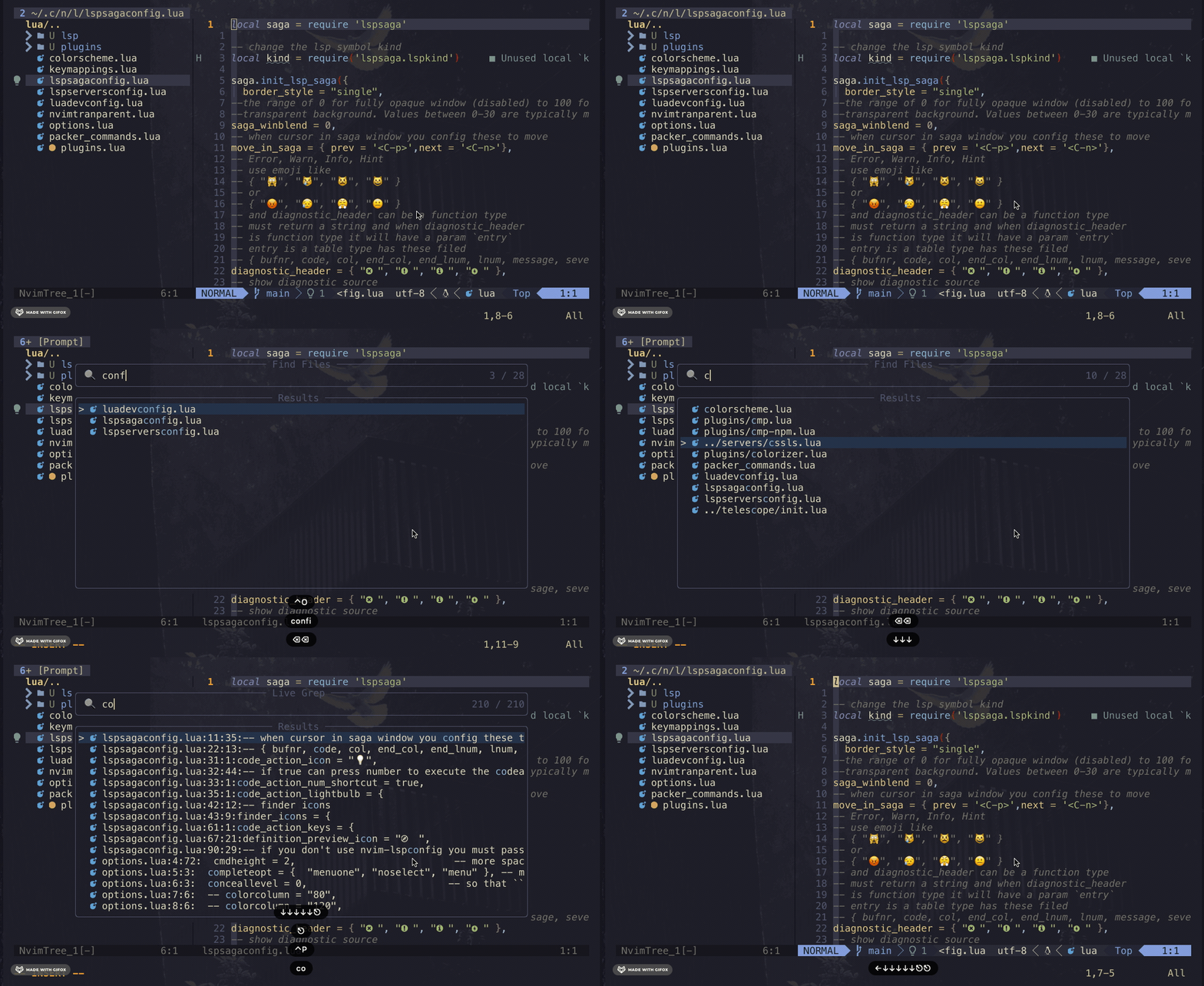
<p>This is one of the plugins I use the most, one of the best fuzzy finders around here.</p>
<p>I like how fast it is and a lot of the options that you can configure with it. Search by file or by a regex expression with a nice UI and a lot of color-schemes are supported.</p>
<p><img src="https://bitbyte.blog/assets/images/tele.gif" alt="telescope" /></p>
<p>Try it: <a href="https://github.com/nvim-telescope/telescope.nvim">Telescope plugin</a></p>
<h3 id="nvim-tree" tabindex="-1">nvim-tree <a class="header-anchor" href="https://bitbyte.blog/blog/my-nvim-config-2022/#nvim-tree"><span aria-hidden="true" class="header-anchor__symbol">#</span>
      <span class="screen-reader-only">Direct link to this section</span></a></h3>
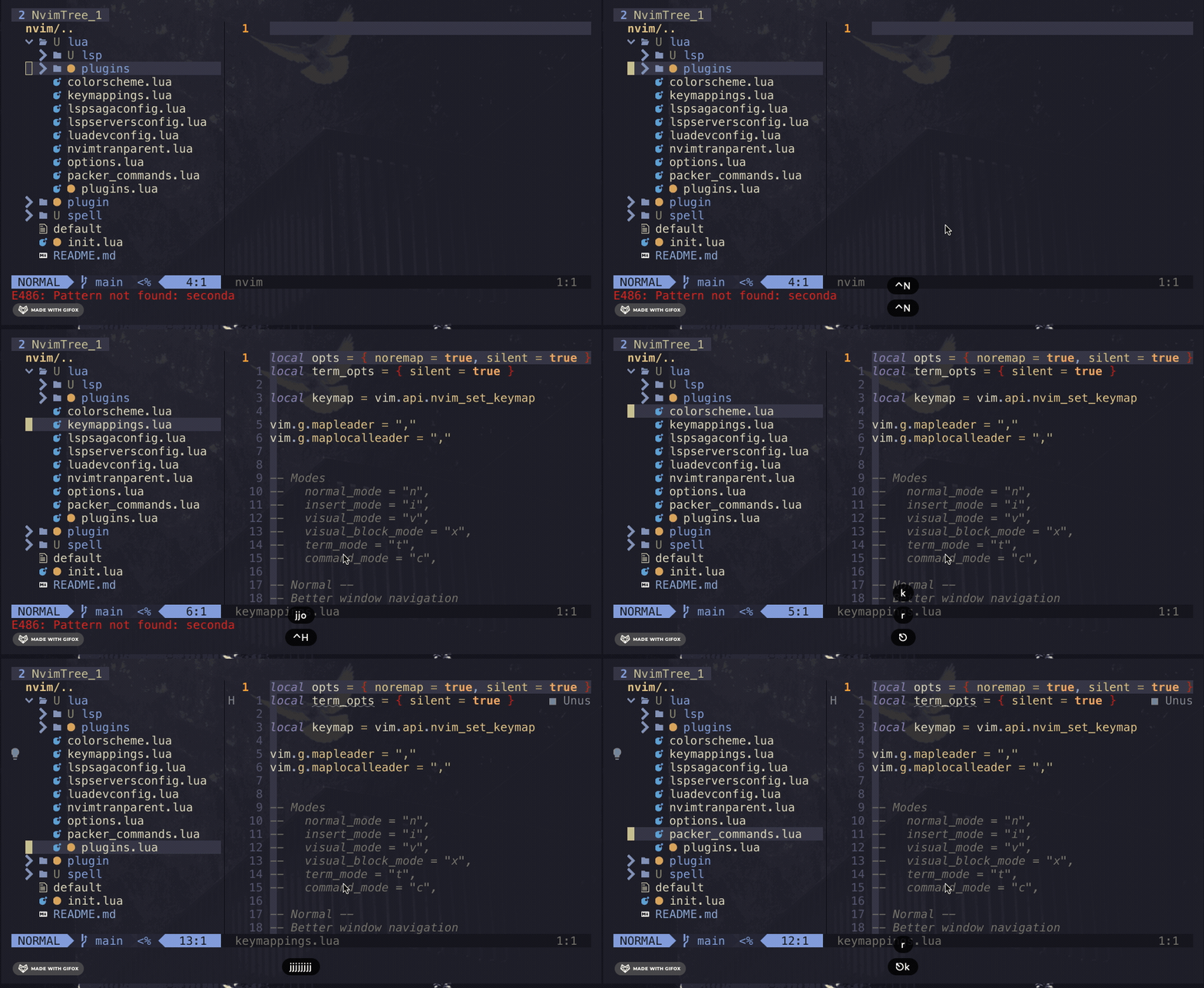
<p>I see it as the <a href="https://github.com/preservim/nerdtree">NERDTree</a> improved, very light and blazingly fast.
You can use web-dev-icons. Extremely configurable but no overwhelming.</p>
<p>It's easy to learn all the keybindings, wanna add a new file? Just type a, edit? e, open? o. So simple and intuitive</p>
<p><img src="https://bitbyte.blog/assets/images/nvimtree.gif" alt="telescope" /></p>
<p>Try it: <a href="https://github.com/kyazdani42/nvim-tree.lua">nvim-tree plugin</a></p>
<h3 id="nvim-tree-sitter" tabindex="-1">nvim-tree-sitter <a class="header-anchor" href="https://bitbyte.blog/blog/my-nvim-config-2022/#nvim-tree-sitter"><span aria-hidden="true" class="header-anchor__symbol">#</span>
      <span class="screen-reader-only">Direct link to this section</span></a></h3>
<p>Tree sitter it's a parser generator for our code in order to nvim can understand our code.
This is very helpful because you can have a lot of cool features for your favorite programming language, like: syntax highlight, folding, text-object manipulation, etc.</p>
<p>The list of supported languages is huge and a lot of new features are being added to nvim.</p>
<p>Try it: <a href="https://github.com/nvim-treesitter/nvim-treesitter">nvim-tree-sitter plugin</a></p>
<h3 id="float-term" tabindex="-1">Float Term <a class="header-anchor" href="https://bitbyte.blog/blog/my-nvim-config-2022/#float-term"><span aria-hidden="true" class="header-anchor__symbol">#</span>
      <span class="screen-reader-only">Direct link to this section</span></a></h3>
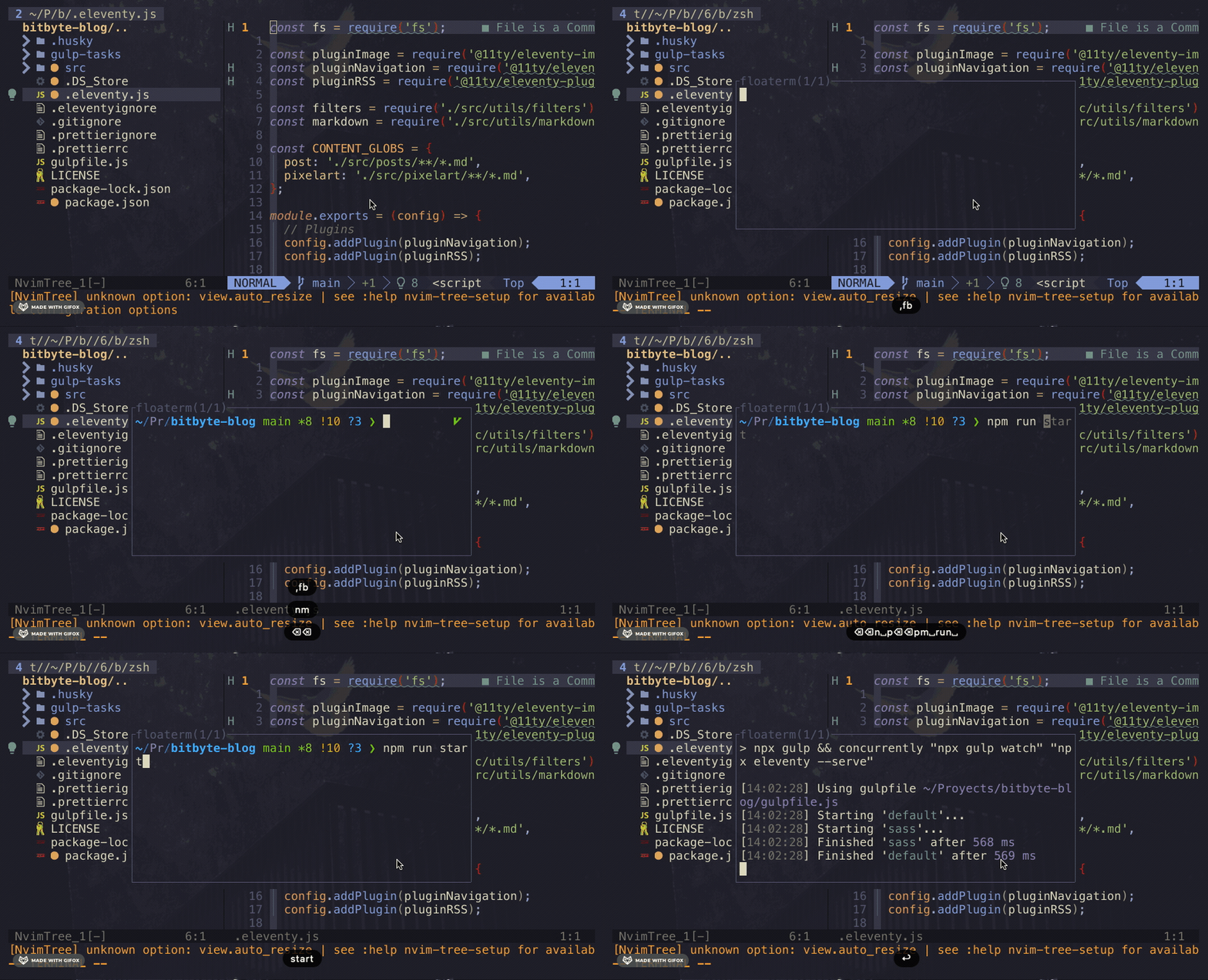
<p>This is one has increased my productivity a lot. Instead of open a new terminal somewhere else of changing between spaces
I just open a new float term. Float term is just a terminal but... floating in your nvim space.</p>
<p>You can have a lot of float terms opened but one is just enough for me. The easy access is hot.</p>
<p><img src="https://bitbyte.blog/assets/images/floatterm.gif" alt="Float Term" /></p>
<p>Try it: <a href="https://github.com/voldikss/vim-floaterm">Float Term plugin</a></p>
<h2 id="more-plugins" tabindex="-1">More plugins <a class="header-anchor" href="https://bitbyte.blog/blog/my-nvim-config-2022/#more-plugins"><span aria-hidden="true" class="header-anchor__symbol">#</span>
      <span class="screen-reader-only">Direct link to this section</span></a></h2>
<p>Those are my most &quot;showy&quot; plugins. I use a lot more but are just for tiny things like color colorizer, lsp config, color-schemes, etc.
I strongly suggest that you vim config should be minimal as you can to get a faster start and use Lua instead of vimrc. This will make your
life easier and happier.</p>
<p>If you wanna see all my nvim config you can check my repo
<a href="https://github.com/hectoraldairah/nvim-config">nvim configuration</a></p>
<p>It's not that fancy so maybe you can understand everything there.</p>
<p>Well, that it! I know for sure that this plugins list will be changing over time but I will stay with the philosphy of less is more</p>
 ]]>
    </content>
  </entry>
  <entry>
    <title>Things I want to learn on 2022</title>
    <link href="https://bitbyte.blog/blog/things-i-want-to-learn-on-2022/" />
    <updated>2021-12-31T00:00:00Z</updated>
    <id>https://bitbyte.blog/blog/things-i-want-to-learn-on-2022/</id>
    <content type="html">
      <![CDATA[ <p>It's the end of the year, and I'm starting to think about what I want to learn in 2022.</p>
<ol>
<li>
<p>A new programming language: I'm thinking on Clojure, Elm, or Elixir. I need to understand better the concepts of functional programming and how to use them. Maybe I'll use this expertise to apply javascript.</p>
</li>
<li>
<p>A new pixel art tool: I used to work with Photoshop and Adobe Flash to make pixel art animations, but I don't want to use them anymore (I can't run any Adobe App now) so I'm thinking to use <a href="https://aseprite.org/">aseprite</a> because I did some basic animation with it two years ago.</p>
</li>
<li>
<p>Blender: I did some 3D animations when I was like 16? on an old mini laptop that I had. It was good at the time with only 2 Gb of ram but man, the software is getting ram expensive. Maybe I can start to make some things with my new computer.</p>
</li>
<li>
<p>How to talk in public: Since 2019, I get the interest to do talks about tech with one cup of acid humor on it. The pandemic was a big problem here because there are no more live meetups and I just forget about it. With the online meetups, I can feel a chance to do it.</p>
</li>
<li>
<p>Back-end: Well, maybe this is kind of huge for me. I've been doing front-end stuff for a while and my backend skills are getting pretty bad. My experience working with <a href="https://expressjs.com/es/">Express</a> and <a href="https://adonisjs.com/">Adonis</a> was pretty good, but it was simple things. I don't know anything about databases too. So, yeah. Maybe I'll buy a course from <a href="https://www.udemy.com/">Udemy</a> for it.</p>
</li>
<li>
<p>CSS Art: Yes, another art stuff. All the <a href="https://codepen.io/tag/css-art">beautiful CSS art that is on codepen</a> makes me want to do something similar. I'm not sure what exactly but some 3D CSS animations are on my eye.</p>
</li>
<li>
<p>Being fluent in Esperanto and learning more about romantic languages: Duolingo and <a href="https://lernu.net/">Lernu</a> are my best friends here.</p>
</li>
</ol>
<p>That's it. I don't want to write more on this post to avoid feeling bad at the end of 2022.</p>
<p>Happy 2022!</p>
 ]]>
    </content>
  </entry>
  <entry>
    <title>An original title for a first blog post</title>
    <link href="https://bitbyte.blog/blog/an-original-title-for-a-first-blog-post/" />
    <updated>2021-12-14T00:00:00Z</updated>
    <id>https://bitbyte.blog/blog/an-original-title-for-a-first-blog-post/</id>
    <content type="html">
      <![CDATA[ <p>Hello, world! This is my first post ever made on this new site.</p>
<p>This is the place where I'm going to write about my life, my work, and my hobbies. The things that I want to save in a secure place instead of my head.</p>
<p>Why am I making this website and not using some other tool like medium?
Well, the first reason is... I don't know how to make a website so I'm making this one.</p>
<p>The second reason is that I want control over the content of my posts and something very simple.
I don't want paywalls, ads, etc. It's just a blog, not a new NTF collection.</p>
<p>Well, maybe I'll add some ads in the future. <strong>That's a bad joke</strong> please ignore it.</p>
<p>The next post will be about how I'm making this website and the resources I'm using.</p>
<p>But if you're a little impatient, you can check out this <a href="https://github.com/hectoraldairah/bitbyte-blog">Github repo</a></p>
<p>I'm using <a href="https://www.11ty.dev/">Eleventy</a> btw.</p>
<p>Quote of the day:
You need to finish your shit before you start your next one. - IDK</p>
 ]]>
    </content>
  </entry></feed>