


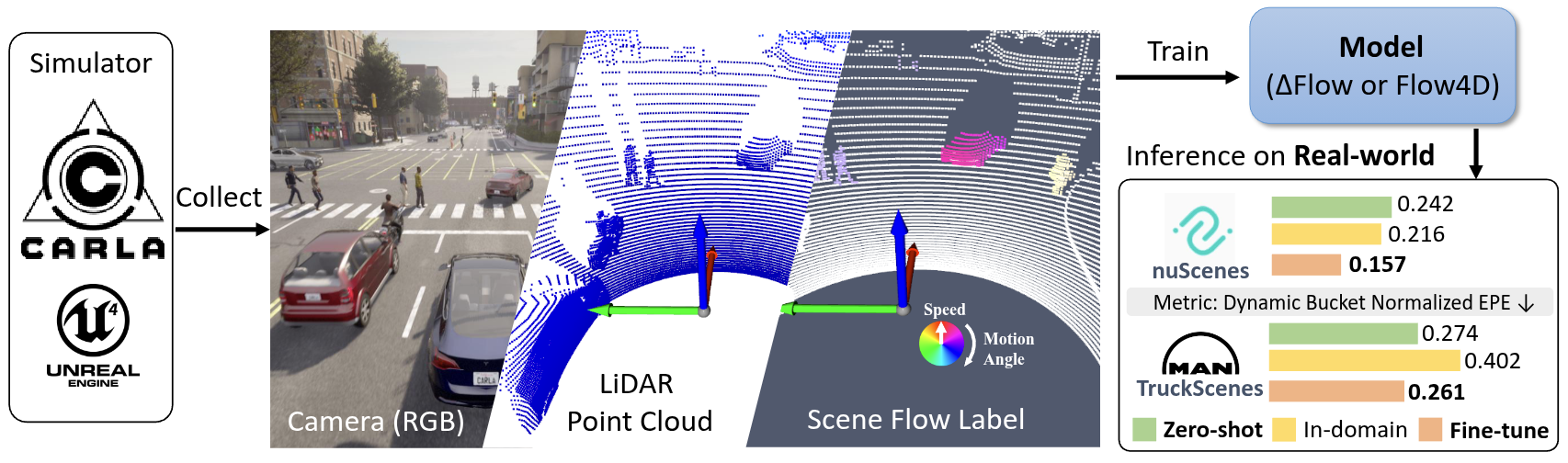
SynFlow got accepeted in ECCV2026, I'm updating the repo and README, stay tuned for the dataset release and code release! Timeline and TODO:
- 2026-06-18: Initial the repo and add README.
- 2026-06-19: Upload the dataset to Huggingface and add the download link in README.
- Update the CARLA code for dataset generation and add the dataset generation instruction in README.
- Add review comment and rebuttal pdf and poster link
Test computer and sftool (py38):
- Desktop setting: i9-12900KF, GPU 3090
- System setting: Ubuntu 20.04, Python 3.8
- Test Date: 2025-12-07, CARLA Version: 0.9.15, Using the conda env sftool (py38)
CARLA Installation, please refer to CARLA Quickstart for detailed instructions. Quick step:
- Download the desired version of CARLA from CARLA Releases
- Unzip the file and navigate to the extracted folder
- Run the following command to start the CARLA server:
./CarlaUE4.sh --quality-level=Epic -carla-rpc-port=2010You can always download the dataset from HuggingFace:
| Dataset/Model | Download Link | Description |
|---|---|---|
| SynFlow-4k | hf/town* | It contains around 4k scenes includes 940k frames with 3D flow ground truth... TODO |
| DeltaFlow weight (trained on SynFlow-4k) | hf/model-ckpt | Model trained on SynFlow-4k dataset, which can be used for evaluation and as a pretrained model for real-world data finetuning. |
| DeltaFlow weight (trained on SynFlow-4k with real-world data) | hf/model-ckpt | Model trained on SynFlow-4k dataset with real-world data, which can be used for evaluation and as a pretrained model for real-world data finetuning. PLEASE NOTE this model is non-commercial use only as it trained on real-world data. |
(Optional) Step 1 - Generate route
If you want to generate the route yourself, you can use the generate_route.py script.
python generate_route.py --map Town01 --min_len 150.0 --max_len 250.0 --sampling_dist 10.0 --resolution 2.0 --min_new_meters 20.0Otherwise, you can download the route from hf/routes-xml and put them into assets/data folder.
Step 2: Generate dataset
You can launch more than 1 CARLA simulator (on different ports) to collect data in parallel. Each process collect 1 route at a time.
Check conf/collect.yaml to modify the sensor settings, NPC density, etc.
# Launch CARLA simulator first
./CarlaUE4.sh --quality-level=Epic -carla-rpc-port=2010

# In another terminal, run the data collection script
python collect_data.py simulation.route_file="./assets/data/town10.xml" 'simulation.route_id=3' simulation.port=2010 simulation.data_output="/home/kin/data/CARLA/data-64-test" sensors.lidar_semantic.channels=64 simulation.max_frames_per_scene=1000 world_settings.logging_level="DEBUG" simulation.record_carla_log=false
When you are ready for full data collection, you can use a bash script to launch multiple processes or :
# Here is 32-channel LiDAR setting example
python collect_data.py sensors.lidar_semantic.channels=32 sensors.lidar_semantic.points_per_second=160000 'simulation.route_id=[0,1,2]' simulation.port=2000 'simulation.route_file=/home/kin/data/CARLA/CARLA_0.9.16/PythonAPI/opensf-carla/assets/data/town01.xml' world_settings.logging_level="DEBUG"
For convenience, you can also use the provided run_all.py script to manage multiple CARLA instances and data collection processes. This script includes automatic restart mechanisms in case of crashes.
python run_all.py --port 2000 --townids "01,02" --data_dir /home/kin/data/CARLA/data-64-460k-7k -m 1000 -s 0 -c 64Key arguments:
--port: CARLA RPC port (TrafficManager uses port+8000 automatically)--townids: comma-separated town IDs, processed sequentially-c: LiDAR channel count (32 or 64)-s: start route ID (useful for resuming large maps like Town12)-r: restart every N routes for memory management (default: 25)--stall_timeout: restart if no output for N minutes (default: 20); CARLA can freeze without crashing after long runs — this detects and recovers from that case--max_ram_gb: emergency restart if system RAM exceeds N GB (default: 55)
Restart triggers (automatic, no manual intervention needed):
| Trigger | Cause | Restarts CARLA? |
|---|---|---|
CARLA_CRASH |
CARLA process died | Yes |
SEGFAULT |
collect_data.py segfault | Yes |
STALL |
No stdout for stall_timeout min (frozen) |
Yes |
ERROR |
collect_data.py non-zero exit | Yes |
MEMORY_RESTART |
N routes completed (memory leak prevention) | Yes |
RAM_EXCEEDED |
System RAM > max_ram_gb | Yes |
Run multiple parallel instances by launching with different --port and --data_dir:
# Instance 1: Town01-02 on port 2000
python run_all.py --port 2000 --townids "01,02" -c 64 --data_dir /data/set-a &

# Instance 2: Town03-05 on port 3000
python run_all.py --port 3000 --townids "03,05" -c 64 --data_dir /data/set-b &You may need create index file index_total.pkl first by running:
python create_data_index.py --data_dir /home/kin/data/CARLA/CARLA_0.9.16/PythonAPI/dataAs we already save the data in the OpenSceneFlow format, we can directly use the OpenSceneFlow visualization tool to visualize the collected data.
cd OpenSceneFlow
python tools/visualization.py --res_name flow --data_dir /home/kin/data/CARLA/CARLA_0.9.16/PythonAPI/data
- Town12 no pedestrian spawned or no walking pedestrian, check carla-simulator/carla#6552 (comment).
Downloaded the zip file then put the bin file to /path/to/carla/CarlaUE4/Content/Carla/Maps/Town12/Nav/Town12.bin.
-
CARLA simulator crash during data collection. Known issues: ; so I added auto-restart mechanism in run_all.py to restart the simulator when crash detected. but still need to investigate on Town12 crash issue for some route id.
-
If CARLA is not work for you, quick check: if port is occupied, you can check the port by running
netstat -ntlp | grep 2010. Or if render driver is working, check blog-Fix Vulkan Segmentation Fault on Linux
- Python Environment Setup: Follow the OpenSceneFlow to setup the environment or use docker.
- Dataset Preparation: Download the SynFlow dataset hf/town*
- Run Command: The training with the following command (modify the data path accordingly):
python train.py slurm_id=$SLURM_JOB_ID wandb_mode=online wandb_project_name=synflow \
     train_data="['data/town-06-07-10', 'SynFlow/data/town-01-05', 'SynFlow/data/town-12']" \
     val_data='$DATA_DIR/val' model=deltaflow loss_fn=deltaflowLoss model.target.decoder_option=default \
     num_workers=16 num_frames=5 model.target.decay_factor=0.4 epochs=21 batch_size=2 \
     save_top_model=3 val_every=3 train_aug=True "voxel_size=[0.15, 0.15, 0.15]" "point_cloud_range=[-38.4, -38.4, -3, 38.4, 38.4, 3]" \
     optimizer.lr=2e-4 +optimizer.scheduler.name=StepLR +optimizer.scheduler.step_size=3 +optimizer.scheduler.gamma=0.9
Trained your own model or downloaded the pretrained weights from Table.
You can also run the evaluation by yourself with the following command with trained weights:
python eval.py checkpoint=${path_to_pretrained_weights} dataset_path=${demo_data_path}If you use this dataset or find our work helpful, please cite our papers, more bib on OpenSceneFlow-Cite.
@article{zhang2026synflow,
  author    = {Zhang, Qingwen and Zhu, Xiaomeng and Jiang, Chenhan and Jensfelt, Patric},
  title     = {{SynFlow}: Scaling Up LiDAR Scene Flow Estimation with Synthetic Data},
  journal   = {arXiv preprint arXiv:2604.09411},
  year      = {2026},
}
@inproceedings{zhang2025deltaflow,
  title={{DeltaFlow}: An Efficient Multi-frame Scene Flow Estimation Method},
  author={Zhang, Qingwen and Zhu, Xiaomeng and Zhang, Yushan and Cai, Yixi and Andersson, Olov and Jensfelt, Patric},
  booktitle={The Thirty-ninth Annual Conference on Neural Information Processing Systems},
  year={2025},
  url={https://openreview.net/forum?id=T9qNDtvAJX}
}
This work was partially supported by the Wallenberg AI, Autonomous Systems and Software Program (WASP) funded by the Knut and Alice Wallenberg Foundation and Prosense (2020-02963) funded by Vinnova.
