Log inSign up
phantomofearth 🌳
12.6K posts
Image
user avatar
phantomofearth 🌳
@phantomofearth
I take a look at #WindowsInsider builds and older Windows betas, with some randomness and bad jokes here and there.
C:
Born January 25
Joined July 2018
565
Following
10.2K
Followers

New to X?

Sign up now to get your own personalized timeline!

Create account

By signing up, you agree to the Terms of Service and Privacy Policy, including Cookie Use.

Terms·Privacy·Cookies·Accessibility·Ads Info·© 2026 X Corp.
Don't miss what's happening
People on X are the first to know.
Log inSign up
  • Pinned
    user avatar
    phantomofearth 🌳
    @phantomofearth
    May 28
    Like what I do and want to support me? Consider tipping/donating on Ko-fi! would be appreciated ❤️
    Support phantomofearth, AKA the feature finding nerd
    Support phantomofearth ❤️
    From ko-fi.com
    6.4K
  • user avatar
    phantomofearth 🌳
    @phantomofearth
    Apr 11, 2024
    Windows Server 2012 build 8019 has been shared/leaked.
    Desktop of Windows Server 2012 build 8019 with an About Windows (winver) window.
    Start screen in Windows Server 2012 build 8019. Four tiles are present: Windows Explorer, Computer, Control Panel and Desktop.
    The Settings charm in Windows Server 2012 build 8019. It is present on the right side of the desktop, with power options, volume, notifications and network status at the bottom.
    Immersive Control Panel in Windows Server 2012 build 8019, with the Personalization page open showing customization options for the Start screen.
    137K
  • user avatar
    phantomofearth 🌳
    @phantomofearth
    Oct 31, 2025
    *Enables the Ask Copilot on taskbar feature to test it out* FBH: "why did you turn it off" ???
    Feedback Hub notification in Windows 11 asking the user to tell Microsoft why they turned off Ask Copilot on taskbar.
    46K
  • user avatar
    phantomofearth 🌳
    @phantomofearth
    Sep 20, 2025
    Windows DreamScene is back! Hidden in the latest Windows 11 Dev/Beta build (26x20.6690) is built in support for setting video files like .mp4 as your desktop background:
    Image
    00:00
    118K
  • user avatar
    phantomofearth 🌳
    @phantomofearth
    Aug 15, 2025
    Windows 11's file operation (copy, access denied, etc.) dialogs are FINALLY getting support for dark mode! Here's how the dialogs look in dark mode at this point, hidden in build 26100.5061. Also notice the light buttons in the top right, still a work in progress of course.
    Windows 11 desktop. Three file operation dialogs are visible, all 3 of which appear in dark mode, respecting the user's preference. In the top left is a copy dialog showing that the current copy operation is 42% complete with about 15 seconds left. In the top right is a folder access denied dialog asking the user to provide permission to rename the SystemResources folder. Notably, the Continue and Skip buttons still appear in light mode, a quirk of this implementation. At the bottom is a "Delete Multiple Items" dialog for recycling, which asks the user if they're sure they want to delete 6 items.
    137K
  • user avatar
    phantomofearth 🌳
    @phantomofearth
    Mar 28, 2025
    You can still bypass the network requirement in OOBE by setting the BypassNRO DWORD yourself. Open regedit, create the DWORD under HKLM\SOFTWARE\Microsoft\Windows\CurrentVersion\OOBE, set it to 1 and reboot. Only the script is gone.
    OOBE in Windows 11. A CMD window is present to show that the current version is 10.0.26120.3653. A regedit window is open to show that BypassNRO has been set to 1. In the bottom right, the "I don't have internet" network page skip button is present.
    121K
  • user avatar
    phantomofearth 🌳
    @phantomofearth
    Dec 11, 2022
    Fun fact: Windows 11 22H2+ includes 'education themes', intended for students using school devices. You can enable them with regedit: 1. Open it and go to HKEY_LOCAL_MACHINE\SOFTWARE\Microsoft\PolicyManager\current\device 2. Create a key in device, call it Education (continued)
    Image
    Image
    Image
    Image
  • user avatar
    phantomofearth 🌳
    @phantomofearth
    Mar 28, 2025
    RIP bypassnro.cmd. (26200.5516/26120.3653)
    Text from an Insider blog post:
[Other]
We’re removing the bypassnro.cmd script from the build to enhance security and user experience of Windows 11. This change ensures that all users exit setup with internet connectivity and a Microsoft Account.
    643K
  • user avatar
    phantomofearth 🌳
    @phantomofearth
    Feb 15, 2023
    You will soon be able to quickly end an entire task/process by right clicking it on the taskbar and choosing a new 'End task' option, Task Manager style. New in build 25300 and hidden. vivetool /enable /id:42592269
    Image
    52K
  • user avatar
    phantomofearth 🌳
    @phantomofearth
    Sep 18, 2023
    The Paint app is getting layers! (app version 11.2308.18.0, should be rolling out to Dev and Canary)
    Windows 11's Paint app with a Layers button in the top right. All existing layers for an image are shown on the right side of the app.
    113K
  • user avatar
    phantomofearth 🌳
    @phantomofearth
    Feb 2, 2024
    Build 26040's rendering issues turn emojis into monsters.
    Windows 11 emoji picker showing several emoji displaying incorrectly.
    Windows 11 emoji picker showing several emoji of people displaying incorrectly.
    31K
  • user avatar
    phantomofearth 🌳
    @phantomofearth
    Dec 6, 2024
    Windows 11's battery icon (in the system tray, quick settings and Settings app) is getting some visual changes: notably, it will turn orange when energy saver is enabled, and green when charging. (1/3)
    System tray in Windows 11. The battery icon is orange to indicate that energy saver is on, as mentioned in the tooltip above it which also mentions the battery status: 73% remaining.
    System tray in Windows 11. The battery icon is green and has a small lightning bolt to indicate that the device is plugged in, as mentioned in the tooltip above it which also mentions the battery status: 73% available.
    41K
  • user avatar
    phantomofearth 🌳
    @phantomofearth
    Apr 8, 2024
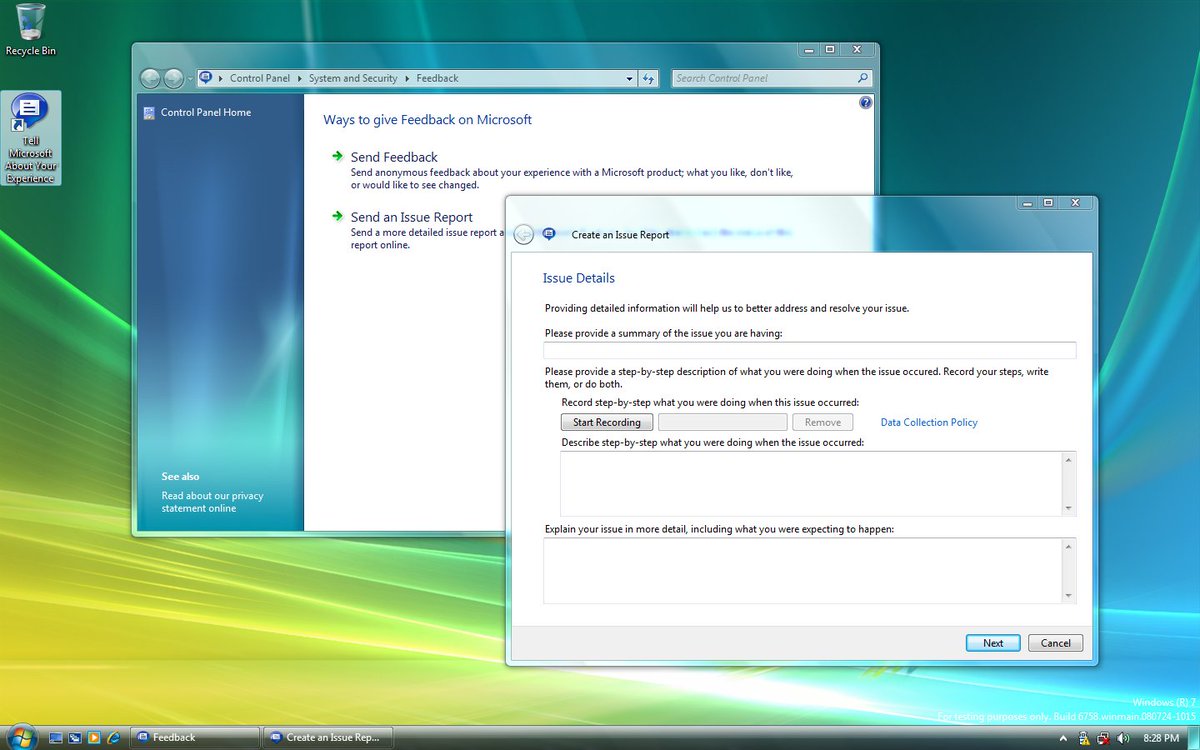
    Windows 7 (M3) build 6758 was shared/leaked recently! It includes a significantly updated Paint application (compared to previous builds) which is more similar to the one in the RTM.
    Desktop of Windows 7 build 6758 with three windows open: an About Windows (winver) window, Calculator and Paint (with the text Hi in the canvas).
    Desktop of Windows 7 build 6758 with two windows open: a Control Panel window open to a Feedback page giving the user some ways to give feedback on Microsoft, and a Create an Issue Report window prompting the user to give issue details.
    Desktop of Windows 7 build 6758 with Bluepill-locked features unlocked, including the superbar (taskbar at the bottom, which has three pinned apps), jump lists (one is visible for Windows Explorer, with frequent folders and an option to unpin the app visible) and the desktop background slideshow feature (a Control Panel window is visible and open to the Desktop Background page with a "Change picture every:" option.)
    Desktop of Windows 7 build 6758 being peeked at using the Aero Peek feature - the outlines of multiple windows are visible on top of the desktop.
    35K
  • user avatar
    phantomofearth 🌳
    @phantomofearth
    Sep 9, 2025
    The dark mode copy dialog was updated in the latest Dev/Beta CU (.5790): the green has been replaced with blue.
    File copy dialog in Windows 11. The dialog is in dark mode, with the graph showing copy progress and speed in blue.
    Windows 11 desktop. Three file operation dialogs are visible, all 3 of which appear in dark mode, respecting the user's preference. In the top left is a copy dialog showing that the current copy operation is 42% complete with about 15 seconds left. In the top right is a folder access denied dialog asking the user to provide permission to rename the SystemResources folder. Notably, the Continue and Skip buttons still appear in light mode, a quirk of this implementation. At the bottom is a "Delete Multiple Items" dialog for recycling, which asks the user if they're sure they want to delete 6 items.
    user avatar
    phantomofearth 🌳
    @phantomofearth
    Aug 15, 2025
    Windows 11's file operation (copy, access denied, etc.) dialogs are FINALLY getting support for dark mode! Here's how the dialogs look in dark mode at this point, hidden in build 26100.5061. Also notice the light buttons in the top right, still a work in progress of course.
    21K